This post contains affiliate links please see the Disclosure and Privacy Policy page for full disclosures here.
Disclaimer: I received a FREE copy of this product through the HOMESCHOOL REVIEW CREW in exchange for my honest review. I was not required to write a positive review nor was I compensated in any other way.

The last few weeks I have been looking at a program that might be a great addition to your homeschool program. It is called Math Shed and Spelling Shed and is a game based educational system from EdShed.
Overview
Teacher Hub
This program allows you as the parent to setup games for your child to practice certain skills or to practice general skills. The teacher hub allows you to not only add your child, but also to give specific assignments to your child to play.

You can set up accounts for each of your children so they will be playing different levels. This helps with tracking their accomplishments. I set up an account for C, but did not have her play as it was a bit advanced for her age. Once you set if your child’s account and set a password, remember it!! I forgot C’s password and had to go back and figure out how to reset it. I also learned how to create assignments for each student. This program is nice because it allows you to set up assignments for specific children or for more than one child. Here is the math assignment I set up for C.
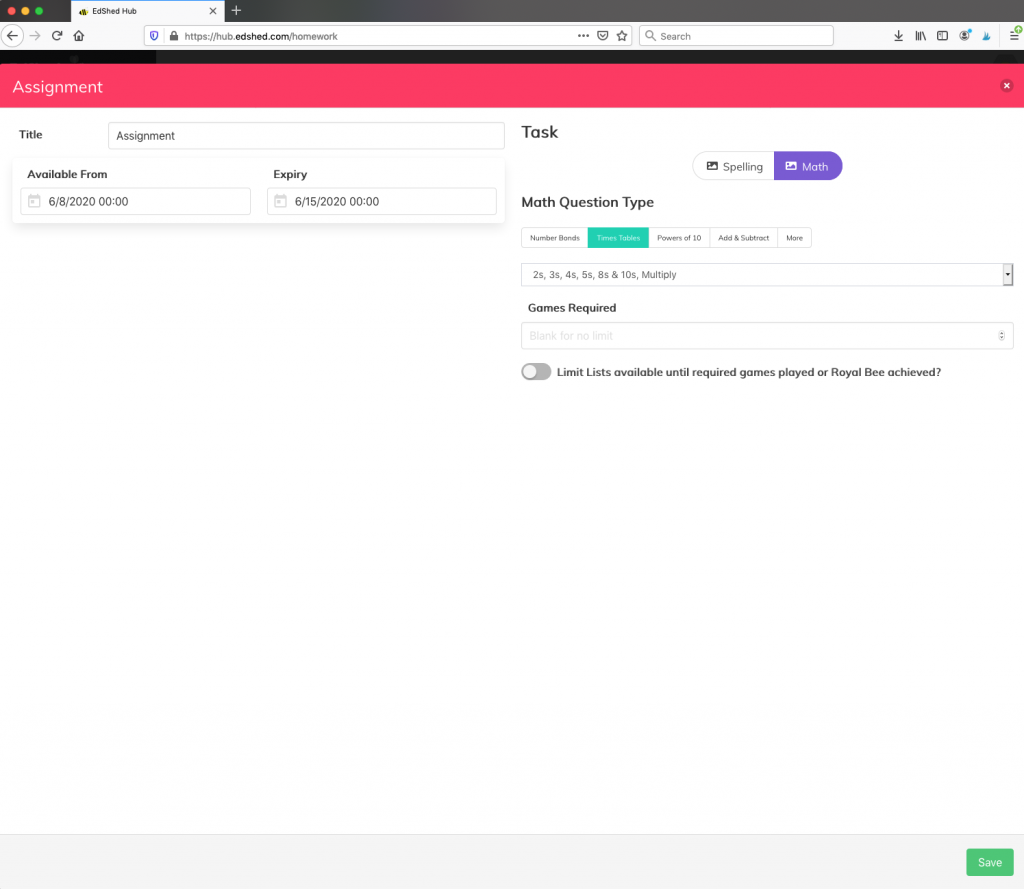
Once you decide on the type of assignment and save all the settings, you then are directed to a screen to pick the student. It also looked like you could set it so that your child had to complete the assignment before playing other games. This is great if your child needs extra reinforcement on a certain concept, but also would like to play extra games.
Another thing that was nice in creating an assignment is that you can set a date to start it and a date to end it. This means you could look through your lessons and preset some activities to go along with future lessons. We all know as homeschooling moms, we get busy and forget sometimes so this is one less thing to forget! Once you set everything up you log out and have your child log in and play!
Student Hub
The students log in and a screen comes up with a choice for them to play Math Shed or Spelling Shed. They can click on which ever game they want or that you tell them to do. If you have more than one child using the program there is an avatar in the top corner of the screen to make sure they are on the right child. They then can select different games to play or their assignment. One of the cool features is that it tells your child right away if they missed one (apparently I need to work on my times tables more cause it was hard!) And they get a list of all the ones they got right or wrong at the end.


The Spelling Shed games are similar. The levels I selected gave you the word first and then you spelled them out. If you messed up it told you right away but still moved on. This is great because a child is not bogged down with getting all the answers wrong, but can celebrate with the words they do know. The medium level reads the word to the child instead of showing it. This would be great if you are working on specific spelling words. You can create your own list to practice the spelling lists from your own curriculum. This is great way to have children practice spelling words without knowing they are practicing.
Usage
I believe this program is a very good enhancement for any math or spelling program. It is very customizable as well as spans a large scope of concepts.
The Math Shed games cover simple addition, subtraction, multiplication, division, counting negative numbers and even some simple algebra where you have to figure out a missing number of the addition or subtraction equation. This means that it is a great program for most families as young children can practice their addition and subtraction and older children can practice their times tables. The program does seem to focus on fluency as you answer as many questions as you can in one minute.
The Spelling Shed games cover most levels of spelling as well. There are simple CVC words as well as Dolch sight words, Fry sight words and UIL sight words all the way to grade 8. My favorite part is being able to input your own words into the games to practice. This would be great for one of your children that struggles with normal ways to practice spelling words.
I believe next school year once C starts to learn how to blend I will definitely use the Spelling Shed easy games to give her a chance to practice spelling without me. I am also thinking of having her start to do the simple addition games. I don’t know if she will get frustrated because she won’t get a large amount of answers in a minute or if it will just be a fun quick game. We will see!
Extras
There are extra bonus games that are nice too. They provide a chance for your child to just play a game without a specific assignment purpose, but also learning. This would be great for a break during the day or for some screen time that is earned. They are still learning, but they think they are playing a game.
Mobile vs. Desktop
I was able to mess around with the program on my phone mostly. This made it a bit difficult to switch between student and teacher accounts because of the screen size and the buttons. I did like though that it is able to be used on a mobile device. We only have a Desktop and C doesn’t understand how to use a mouse yet, so anything that I can have her do on her own on the tablet is a plus! On the other hand, I loved the layout of the teacher portal on the desktop. It was super easy to navigate. I also loved the charts where you could see what your child has done and where they need more work on the desktop. It was a bit harder to navigate on my phone. There is also an app that would work for the iPhone, but I didn’t buy the app this time. I think it would be a great investment if you had a iPad or iPhone your child uses all the time.
Check out the other reviews of Math Shed and Spelling Shed when you click on the image below.